



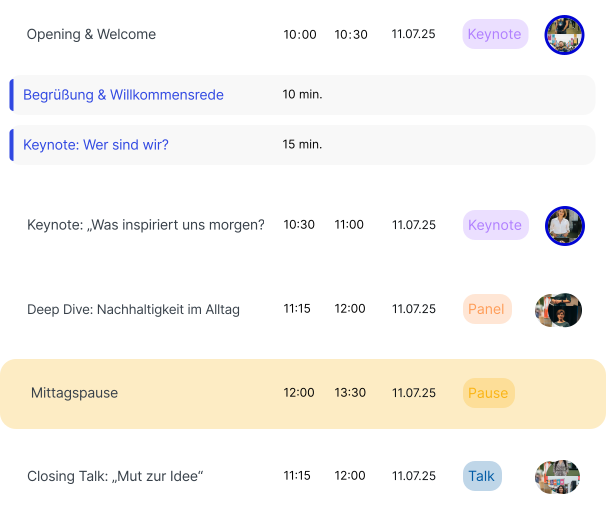
As a planner, you always have an overview of the complete schedule of your event with the Planner. This central tool helps you present all programme items in a structured way – including times, stages and involved persons. You can assign a suitable programme type such as lecture, panel or workshop to each programme item and organise your entire event programme clearly and collaboratively. The filter and sorting function lets you quickly find relevant content – for example by date, stage or format.
You can create new content directly in the Planner and edit it flexibly: add speakers, upload attachments or create a precise schedule description. Production notes with time details can also be added – perfect for the technical schedule and communication with the production team.
The Planner is the centrepiece of the entire iveo platform: all other functions – from the Event Website to the production views and screen graphics – draw on the data you enter here. This means: enter once, available everywhere. You avoid double maintenance and ensure that all those involved always work with the same, up-to-date information.
The Planner is particularly powerful for teams: multiple people can work on different programme items simultaneously, and changes are immediately visible to everyone. Whether an event agency coordinating a large conference programme or a smaller team planning a corporate event – the Planner adapts to your way of working.
This allows you to plan, prepare and spontaneously adjust your entire event if needed. The Planner is thus a central tool for smooth production management and seamless communication with your entire team – from the first idea through to the follow-up.
The Planner shows its full strength especially at larger events with hundreds of programme items and many parallel tracks: the visual representation by stages and timelines makes even complex programmes understandable at a glance. Programme committees can jointly prioritise content, optimally fill stages and avoid overlaps. And when changes arise shortly before the event – which is almost always the case – these are implemented in the Planner in seconds and immediately visible to all involved. No printing, no distributing, no version confusion.